


So, you're ready to turn that dusty old laptop into a bit of cash? In the UK, you've got a few solid options. For pure speed and convenience, specialist buyback services like EXE are hard to beat. If you're chasing the highest possible price, then peer-to-peer marketplaces like eBay are your best bet. And for a simple upgrade, there's always the high-street trade-in schemes.
Each one strikes a different balance between how much money you'll get, how much effort you'll put in, and how quickly you'll get paid.
Choosing Where to Sell Your Old Laptop
Figuring out the best place to sell your laptop really comes down to one question: what's most important to you? Are you after the absolute top price, a super-fast sale with no faff, or just a discount on a shiny new machine? Each path has its own pros and cons.
It’s a bit like selling a car. You could go the private route for the best price, but that means writing ads, fending off time-wasters, and sorting out all the paperwork yourself. Or, you could part-exchange it at a dealership for a smooth, easy upgrade, knowing you probably won't get top-dollar. Specialist buyers sit somewhere in the middle—offering a fair, guaranteed price without the headache.
To pick the right path, you need to know what you want to get out of it:
- Getting the Most Cash: This almost always means selling directly to another person. It can bring in the biggest payout, but it also takes the most time and effort—creating listings, haggling over prices, and dealing with postage.
- A Quick and Easy Sale: If you just want the laptop gone and the money in your account without any drama, a professional buyback service is the way to go. You'll get an instant quote and often have the cash within a day or two.
- A Simple Upgrade: When the main goal is just to knock a bit off the price of a new laptop, trading your old one in when you buy is by far the easiest option.
This decision tree gives you a clear idea of how your priority—be it cash, speed, or an easy upgrade—should guide your choice.
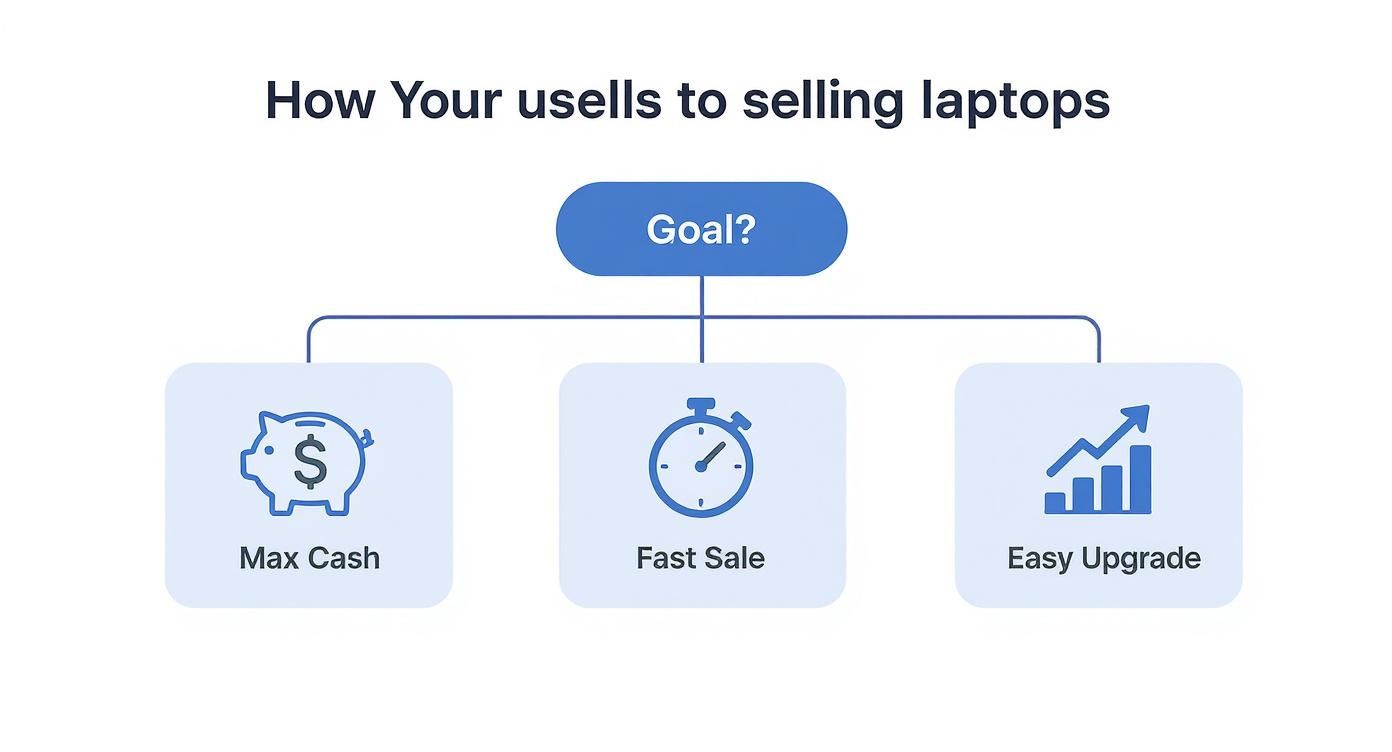
As you can see, there's a definite trade-off between the money you make and the effort involved. Pinpoint what matters most to you from the get-go, and you'll quickly find the best strategy for your situation.
Quick Comparison of UK Laptop Selling Options
To help you decide at a glance, here’s a quick rundown of the main options, highlighting what they're best for and what you can expect.
Ultimately, the best choice is the one that fits your needs. Whether you have the time to invest for a bigger return or just want a quick and painless process, there's an option out there for you.
Getting Your Laptop Ready to Sell for the Best Price
Before you even think about listing your old laptop, a little bit of prep work can seriously boost its value and, just as importantly, keep your personal data safe. It’s a bit like getting a car ready to sell – a good clean and polish can add hundreds to the price tag. The same logic applies here; you’re turning a dusty, forgotten gadget into something someone will actually want to buy.
First things first, let's talk about appearances. Give the laptop a proper physical clean. Grab a microfibre cloth and some screen-safe cleaner to get rid of all those fingerprints on the display. A can of compressed air works wonders for blasting dust and biscuit crumbs out from between the keys. Don't forget to wipe down the lid and base to get it looking as smart as possible.
Next, round up all the bits and pieces that came with it. We're talking about the charger, any original cables, and especially the box if you've still got it stashed away somewhere. A laptop that comes with its original packaging just feels more complete and well looked after, which really helps its value.
Wiping Your Data and Getting It Ready for a New Home
This is the most important part, so pay close attention. Your laptop is a treasure trove of your personal information – photos, private documents, saved passwords, you name it. If you don't wipe it properly, you're leaving yourself wide open.
Before you touch anything else, back up all your important files. Seriously. Use an external hard drive, or a cloud service like Google Drive or Dropbox, and save everything you can't bear to lose. Double-check that the backup has worked before you move on.
Once you’re sure your data is safe, it's time to perform a factory reset. This process wipes the hard drive clean and reinstalls a fresh version of the operating system, taking it back to the state it was in when you first unboxed it.
Crucial Tip: A factory reset is absolutely non-negotiable. Not only does it protect your private information, but it also gives the new owner a clean slate. This is a huge selling point that builds trust and helps you get a better price, faster.
Taking Good Photos and Setting the Right Price
Now for the final touches. Take some clear, well-lit photos of the laptop from all angles. Make sure you get shots of the screen turned on (to prove it works!), the keyboard, the ports, and any cosmetic damage. Being upfront about a few minor scratches is always the best policy and shows buyers you're trustworthy.
To figure out what your laptop is actually worth, you need to understand its specs. You can use online resources that let you compare computer hardware in France to get a feel for the value of its components, which gives you a solid starting point for pricing. This kind of research puts you in a great position to get the best deal, especially in the UK's booming refurbished tech market.
That market was valued at a whopping $4.11 billion and is forecast to more than triple by 2035 as more people look for great value. You can find out more about the UK’s growing love for refurbished gadgets on marketresearchfuture.com.
Using Peer-to-Peer Marketplaces like eBay or Gumtree

If getting the absolute best price for your old laptop is your top priority, then selling it directly to another person is often the way to go. Platforms like eBay, Gumtree, and even Facebook Marketplace let you cut out the middleman, putting you in direct contact with buyers and letting you keep more of the profit.
The upside is total control. You decide the price, write the description, and manage the sale from start to finish. The trade-off, of course, is that this route demands the most time and effort. It's a bit like selling a car privately instead of trading it in at a dealership – you’ll almost certainly get more money, but you're the one who has to do all the legwork.
Creating a Listing That Sells
To get noticed on a busy marketplace, your listing needs to be spot-on. That means being completely honest and incredibly detailed in your description. Nobody trusts a vague advert.
First, nail down the core specs. List the brand, model, screen size, processor (e.g., Intel Core i7), RAM (e.g., 8GB), and storage (e.g., 256GB SSD). It’s also wise to mention the operating system and its current version.
Next, be upfront about its condition. Talk about what works perfectly, but don't hide the bad stuff. Point out any scratches on the lid, a sticky key, or a dodgy battery. Back all this up with clear, well-lit photos from every angle. Good pictures are non-negotiable; they build trust instantly.
A great listing answers every question a buyer might have before they even think to ask it. This level of transparency doesn't just attract more serious buyers—it also cuts down on the endless back-and-forth messages, saving you a ton of time.
Managing the Sale and Staying Secure
Once your listing goes live, the work isn't over. You’ll be fielding questions, dealing with offers, and eventually arranging payment and postage. This is where you need to have your wits about you.
Here are a few tips to keep the process smooth and safe:
- Keep Communication On-Platform: Always use the marketplace’s own messaging service to talk to buyers. This creates an official record that can protect you if anything goes wrong.
- Insist on Secure Payments: Stick to the platform's approved payment methods, like PayPal Goods & Services on eBay. Never, ever agree to a bank transfer or another off-site payment – you'll have zero protection if they don't pay up.
- Price it Right: Do a quick search for what laptops like yours have actually sold for recently. Pricing competitively from the get-go will bring in more viewers and lead to a faster sale.
- Pack it Like a Pro: When you post it, use a strong box with loads of bubble wrap or padding. Damage in transit is a nightmare you want to avoid. Always, always use a tracked and insured delivery service.
Selling direct can be the best answer to "where to sell old laptops for the most money", but it takes a bit of patience. If you put in the effort to create a fantastic listing and manage the sale carefully, you can turn that dusty old machine into a nice chunk of cash.
Selling to Specialist Buyback and Refurbishment Services
If the thought of writing listings, taking photos, and haggling with strangers puts you off, then a specialist buyback service is probably your best bet. This is the ‘sell it and forget it’ route for your old tech.
Companies like MusicMagpie, CeX, and dedicated laptop specialists like EXE have built their businesses on taking the hassle out of selling. They’ll give you a straightforward, guaranteed price for your old laptop, letting you skip the entire song and dance of a private sale.
This path is perfect for anyone who prioritises convenience and speed over squeezing every last penny out of their device. The whole thing is designed to be simple: you tell them what you have, they give you an instant quote, and if you like the price, you post it to them—often for free.
How the Buyback Process Actually Works
Once your laptop lands with them, their technicians give it a thorough once-over. They’re checking that the condition and specs match what you told them online. It's all about making sure the screen, keyboard, battery, and all the internals are working as they should be.
This inspection is the crucial bit. If your laptop is in better shape than you thought, they might offer you more. If it has a few more scuffs or a key that sticks, they'll revise the quote downwards. Any decent company will always get your approval on a new price before moving forward. And if you say no? They’ll simply send your laptop back, no charge.
One of the biggest plus points here is the guaranteed, professional data wiping. These services perform a proper, GDPR-compliant data erasure on every single device they receive. For many people, that peace of mind is worth its weight in gold, offering a level of security that’s tough to replicate at home.
With the inspection done and the price agreed, you get paid. Fast. Most services will have the cash in your bank account within a day or two of getting your laptop. It's this speed and simplicity that makes it such a popular choice.
The Bigger Picture: Why Refurbishment Matters
These services aren't just buying your old kit; they're giving it a new lease of life. They professionally refurbish the devices, making them work like new, and then sell them on. This extends the lifespan of the tech and makes it accessible to people who can't afford to buy brand new.
It’s a huge market. The UK laptop sector is already worth a massive $6.08 billion and is expected to climb to $8.09 billion by 2034. The refurbished market is a key engine driving that growth, giving people a smart alternative to pricey new models from brands like Apple. If you're curious about the numbers, this in-depth market report from researchandmarkets.com breaks it all down.
So, when you sell to a specialist, you’re not just getting a fair price quickly. You're also doing your bit for a more sustainable, circular economy. It’s a smart, secure, and responsible way to get cash for your old tech.
Using High Street and Manufacturer Trade-In Schemes
If you're already eyeing up a new laptop, trading in your old one can feel like the most obvious and straightforward choice. Big high-street names like Currys and direct manufacturers like Apple have this down to a fine art, with slick schemes designed to make your upgrade feel totally seamless.
The whole idea is beautifully simple. You bring them your old machine, and they give you instant credit towards a new one right there and then. It's a lot like part-exchanging your car – you drive the old one in, sort the paperwork, and drive the new one out, with the value of your old motor neatly subtracted from the final price.
This path is paved with convenience. You don't have to write any listings, deal with endless questions from potential buyers, or faff around with postage. You just walk into a shop or fill out a quick form online, and it’s a done deal. For anyone who's short on time, that kind of simplicity is gold.
Weighing Convenience Against Cash Value
But here’s the catch: that unparalleled ease comes at a cost. The store credit you'll be offered is almost guaranteed to be less than the cash you could get selling it privately or through a specialist buyback service. These retailers are running a business, after all, and they have to factor in their own costs and profit for refurbishing and reselling your old laptop.
You're essentially trading a chunk of your laptop's market value for the convenience of a quick and easy transaction. This is the fundamental trade-off you need to get your head around.
As a rule of thumb, ask yourself what's more valuable to you right now: your time, or the maximum possible cash in your pocket? If an instant discount on that shiny new laptop today sounds better than a bigger payout in a week or two, then a trade-in is a perfectly good option.
When Does a Trade-In Make the Most Sense?
So, when is trading in the smart move? It really boils down to your own situation and what you're trying to achieve.
A trade-in is often the best route if you are:
- Buying a new device from the same retailer: The whole process is integrated, making the upgrade completely painless.
- Not fussed about squeezing every last quid out of it: You'd rather have a quick, simple handover than hold out for the top price.
- Wary of selling online: You just feel more comfortable dealing face-to-face with a big, reputable brand.
At the end of the day, these schemes offer a very low-effort, no-nonsense solution. They won't give you the best financial return, but for anyone who just wants a hassle-free discount on their next big tech purchase, their simplicity is a massive plus.
Why Selling Your Old Laptop Is a Smart and Sustainable Choice
When your old laptop starts gathering dust in a drawer, it’s tempting to just forget it's even there. But giving that device a new lease of life is so much more than a way to make a bit of extra cash—it's a smart, sustainable choice with some pretty significant real-world benefits.
Deciding where to sell your old tech isn't just a simple transaction; it's you playing a part in the circular economy. Instead of letting valuable technology go to waste, you’re giving it a second life. This single action helps cut down the demand for brand-new manufacturing, which in turn saves precious resources and energy.
Boosting Sustainability and Reducing E-Waste
Let's be honest, electronic waste (e-waste) is one of the fastest-growing environmental headaches we face. Old gadgets are packed with materials that can be pretty nasty if they end up in a landfill, but they also contain valuable metals that are perfect for being recovered and used again. Selling your laptop is one of the most direct ways you can tackle this problem head-on.
When you choose to sell, you're making sure your device is either put to good use by someone else or properly recycled by professionals who know what they're doing. It keeps it out of the bin and contributes to a healthier planet.
Every laptop that is refurbished and resold is one less that needs to be manufactured from scratch. This small step has a massive collective impact on reducing our environmental footprint.
The UK's refurbished laptop market, valued at around $264 million, is a powerful force for good here. It helps us deal with the UK’s massive e-waste problem, where over 500,000 tonnes are illegally shipped abroad each year. Better still, remanufacturing a laptop can reuse up to 99% of its original materials, which just goes to show how effective this whole process is. If you want to dive deeper into the numbers, you can find the full refurbished market report on cognitivemarketresearch.com.
Making Technology Accessible for Everyone
Beyond all the green benefits, selling your old laptop has a really positive social impact too. A refurbished, affordable device can be an absolute game-changer for a student, a small business just getting off the ground, or a family on a tight budget.
That machine you've moved on from could become someone else's essential tool for learning, working, or just staying in touch with family. It helps to level the playing field, closing the digital divide by putting powerful technology into the hands of people who might not be able to afford it brand new. So, when you sell, you’re not just clearing out clutter—you’re creating opportunity.
Got Questions About Selling Your Laptop? We've Got Answers
When you're ready to sell, a few final questions often pop up. Here’s a quick rundown of the most common things people ask, with straightforward answers to help you get the best deal.
How Much Is My Old Laptop Worth?
That’s the big question, isn't it? The value really boils down to four key things: its age, brand, model, specs (processor, RAM, storage), and, of course, its overall condition. A nearly new, top-spec MacBook Pro will naturally be worth a lot more than a five-year-old budget Windows laptop that’s seen better days.
For a quick ballpark figure, pop your laptop’s details into a few different buyback websites. To see what people are actually paying right now, your best bet is to search for your exact model on eBay and filter by "sold" items. This gives you a real-world market price.
Is It Safe to Sell My Laptop?
Absolutely, as long as you do one thing first: securely wipe all your personal data. A factory reset is the standard and most important step. It completely erases your files and reinstalls a fresh, clean version of the operating system, leaving none of your personal information behind.
For extra peace of mind, selling to a reputable specialist buyback service is a great option. They perform professional, GDPR-compliant data wiping on every single device as standard, guaranteeing your private information is gone for good.
What if My Laptop Is Broken?
Don't just chuck it in a drawer! A broken laptop isn't necessarily worthless. Whether it’s got a cracked screen, a dead battery, or a dodgy keyboard, there's a good chance you can still get some cash for it.
Specialist buyback services are usually the best place for damaged tech. They’re experts at salvaging working components and will give you an upfront quote based on the specific fault. Just be honest about the damage to get the most accurate price.
Do I Need the Original Charger and Box?
Having the original charger is a big plus. You'll almost always get a better price if you include it, as it's something the next owner will definitely need. Missing it will likely see your offer reduced.
The original box? It’s nice to have but not a deal-breaker. It might add a little value or make your listing look more attractive in a private sale, but you can certainly sell your laptop without it.
Ready for a fast, fair, and secure way to get cash for your old laptop? EXE offers instant quotes, free collection, and immediate payment. We beat high-street offers and accept devices in any condition. Get your free, no-obligation quote today at https://www.exe.co.uk.